LucidHoldem

Study ante tournaments through frequencies and reasons

LucidHoldem is a poker study app that brings preflop ranges, practice questions and hand history review together. Stack depth and antes change the right decision. For each spot you see frequencies from our own calculations and a one-line reason for the recommended play.

All features are currently free.

Start on the web Study guides

Try one question below, no sign-up needed

Try one decision now

8‑max · BB ante 1bb · 20bb

BTN · Folded to you

A♠4♥A4o Offsuit

Which do you choose: Fold, Raise 2bb or All-in?

Choose once to see your feedback and explanation.

The question and grade use the same computed data as the chart below.

Where you can use it

Web
Available now
Android
Closed testing (coming soon)
iPhone
Coming later

Full BTN first-in chart: 8‑max, 20bb, 1bb ante

This is the full chart for the spot above. It shows how the BTN plays all 169 hands when it is first in at 8‑max, 20bb, with a 1bb BB ante. After you answer, find the A4o cell.

Raise 2bb
34.0% of all 1,326 combos
All-in
5.4% of all 1,326 combos
Fold
60.6% of all 1,326 combos

The colored area of each cell shows how often each action is taken. EV differences are in bb, relative to folding.

The A4o cell has a teal outline. In the app's Study screen you can tap any cell to see its frequencies and EV difference at a larger size.

Our own preflop chart, computed together with simplified postflop play. It is not the GTO solution for the full game.

For study only · Do not use during actual play

AA
AKs
AQs
AJs
ATs
A9s
A8s
A7s
A6s
A5s
A4s
A3s
A2s
AKo
KK
KQs
KJs
KTs
K9s
K8s
K7s
K6s
K5s
K4s
K3s
K2s
AQo
KQo
QQ
QJs
QTs
Q9s
Q8s
Q7s
Q6s
Q5s
Q4s
Q3s
Q2s
AJo
KJo
QJo
JJ
JTs
J9s
J8s
J7s
J6s
J5s
J4s
J3s
J2s
ATo
KTo
QTo
JTo
TT
T9s
T8s
T7s
T6s
T5s
T4s
T3s
T2s
A9o
K9o
Q9o
J9o
T9o
99
98s
97s
96s
95s
94s
93s
92s
A8o
K8o
Q8o
J8o
T8o
98o
88
87s
86s
85s
84s
83s
82s
A7o
K7o
Q7o
J7o
T7o
97o
87o
77
76s
75s
74s
73s
72s
A6o
K6o
Q6o
J6o
T6o
96o
86o
76o
66
65s
64s
63s
62s
A5o
K5o
Q5o
J5o
T5o
95o
85o
75o
65o
55
54s
53s
52s
A4o
K4o
Q4o
J4o
T4o
94o
84o
74o
64o
54o
44
43s
42s
A3o
K3o
Q3o
J3o
T3o
93o
83o
73o
63o
53o
43o
33
32s
A2o
K2o
Q2o
J2o
T2o
92o
82o
72o
62o
52o
42o
32o
22

What you can do in the app

The screens below were taken in the app's default state right after opening it. The Analyze screen shows a sample hand history made for this page. The app has three tabs: Study, Practice and Analyze.

Study: ranges and calculations for each spot

Choose the player count, stack depth and the actions in front of you to open that spot's 13×13 range. Each cell is filled with raise, call, all-in and fold colors in proportion to their frequencies. Tap a cell to see frequencies and expected values per combo. The Study chart colors raises red and folds blue.
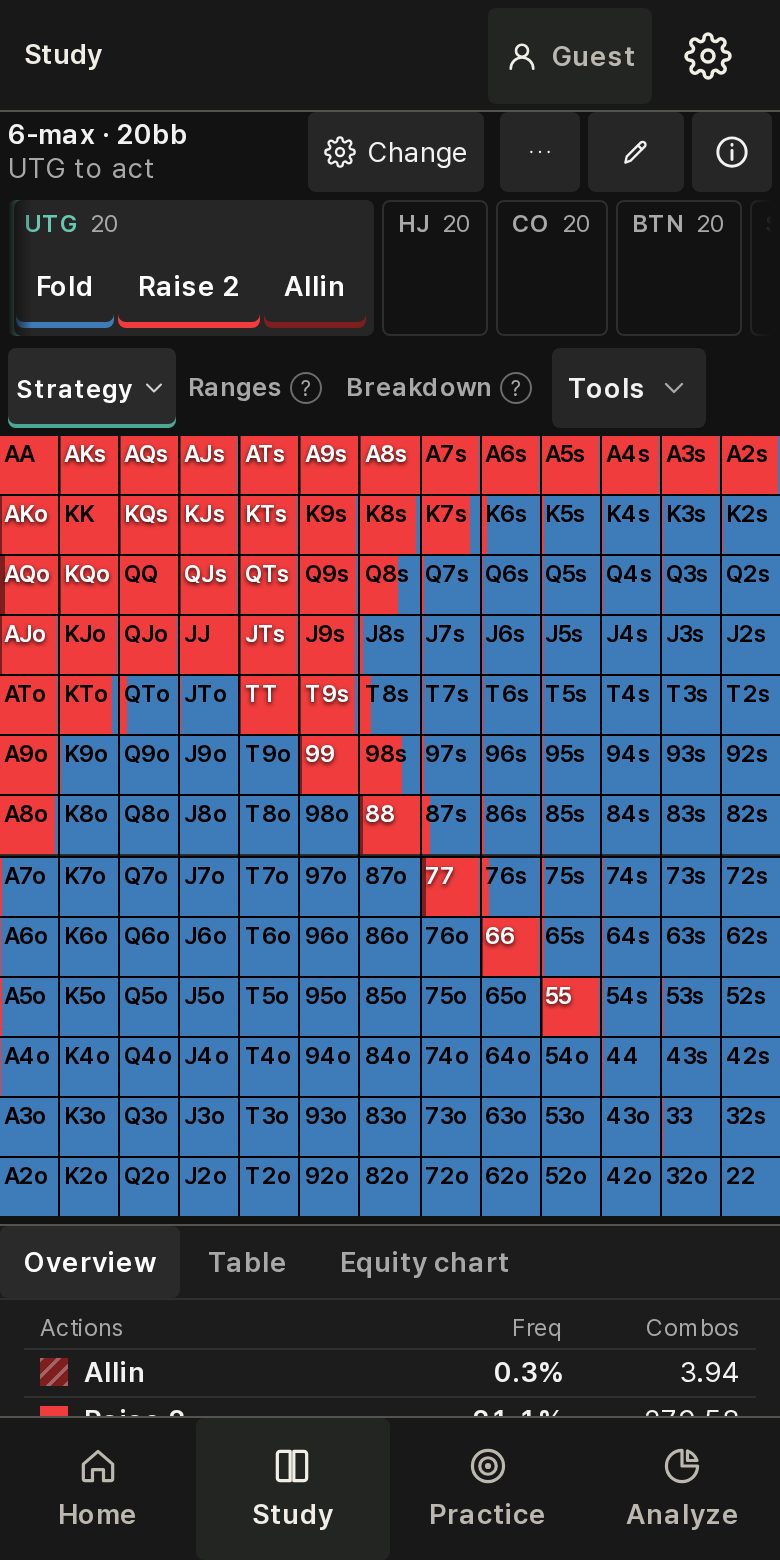
Study screen: 6‑max 20bb UTG opening range as a 13×13 chart with frequencies per action
Study · 6‑max 20bb UTG open chart (red raise · blue fold, as shown in the app)
  • Preflop ranges: 2–9 players, ante tournaments at 10bb and 20bb
  • Flop calculations: heads-up flop strategy solving, and custom server solves with your own conditions (5 per account per day)
  • Node Lock: fix an opponent's choices on the turn or river and recalculate your response on this device
  • ICM stage ranges: compare call thresholds for one spot using finish‑place shares
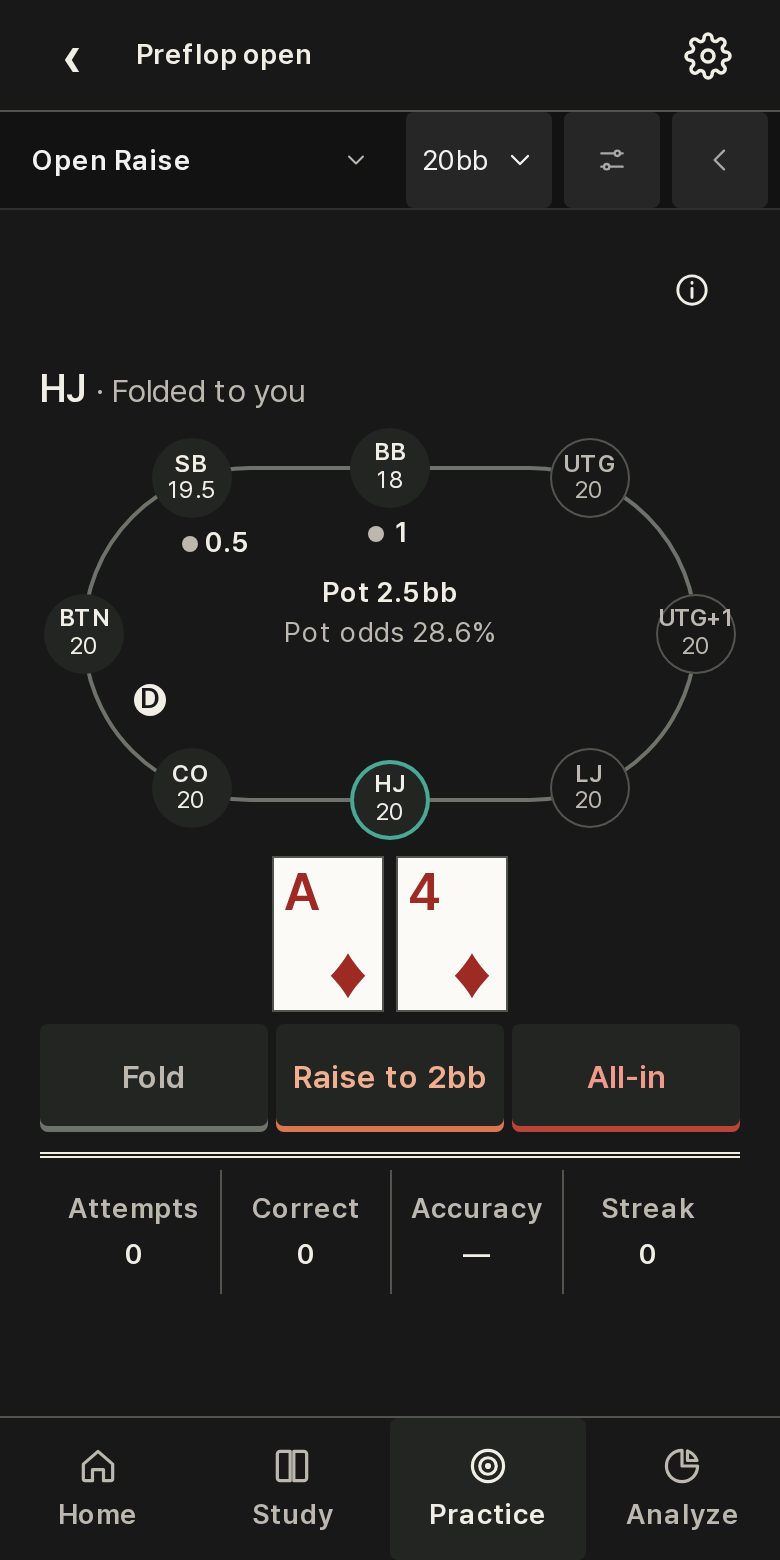
Practice: choose once, get graded right away

Make one choice on a table screen that shows the seats, stacks and pot. Your choice is graded immediately, with our computed frequencies and an explanation of why it was right or wrong. You can repeat the same kind of spot as often as you like, and open up to four tables on one screen.

Practice screen: 8‑max preflop quiz table with seats including UTG+1 and Fold, Raise and All-in buttons
Practice · 8‑max preflop quiz
  • Preflop quiz: random open, 3-bet, cold call, squeeze and push/fold spots
  • Range practice: paint a 13×13 chart yourself and get graded against the reference chart
  • Single-scene decisions: choose once in one realistic scene and see the grade and the reason
  • Practice records: review hands, sessions and stats to find the spots you miss most

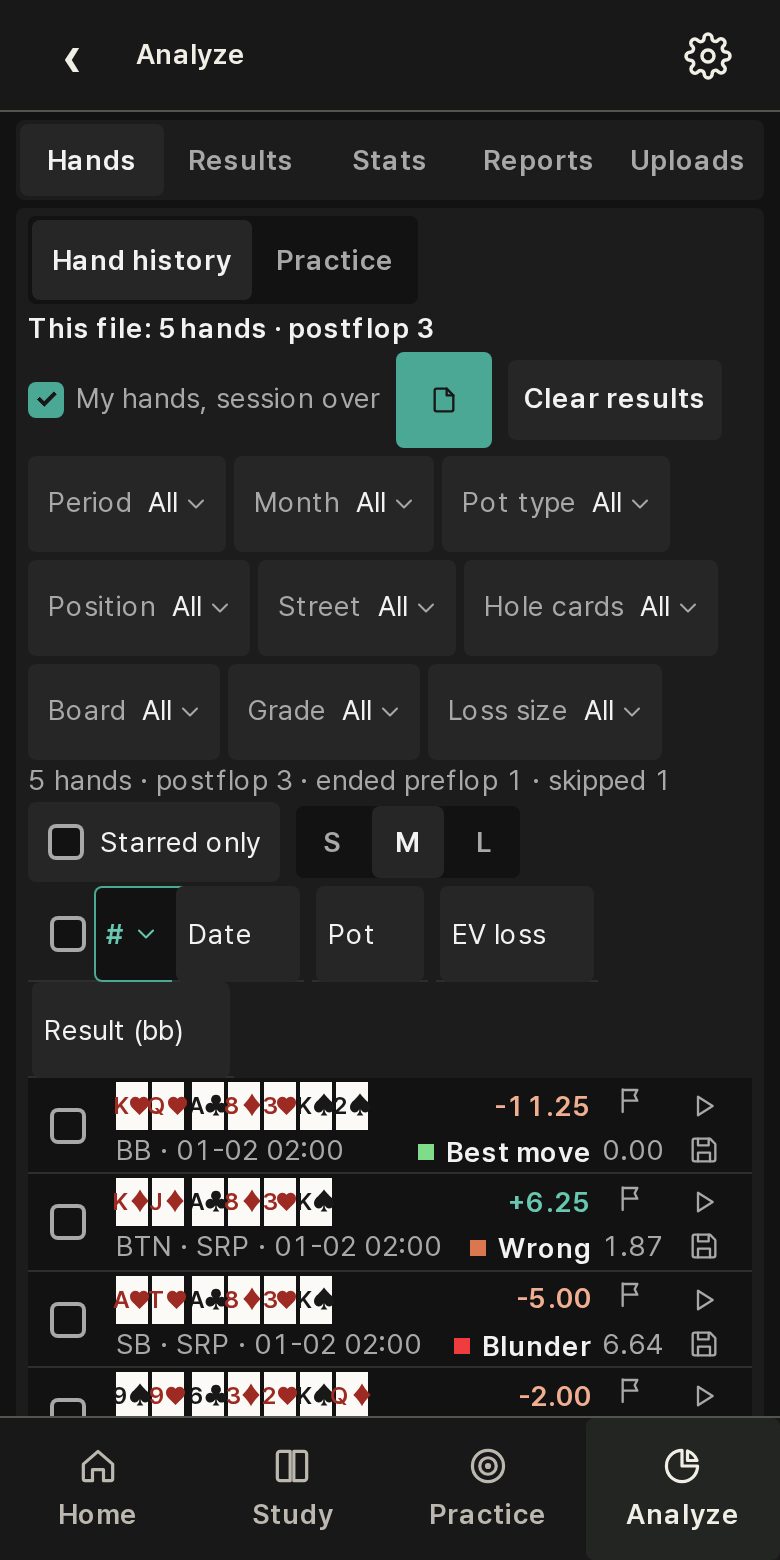
Analyze: review your own hand histories

Upload a hand history (.txt) exported from PokerStars or GGPoker, and each decision is compared with computed values. If you are not signed in, the file is processed only on your device. Decisions are graded by EV loss, and the Results and Stats screens group them by period and seat.

Analyze screen: grades and EV losses for a 5-hand sample hand history
Analyze · sample hand history (top 3 of 5 hands)
  • Hands: grade, EV loss, result and a replayer for every hand
  • Results: cumulative result, all-in EV, showdown lines and tables by seat
  • Stats: five-grade distribution, tables by street and the spots where you lose most
  • Equity: hand versus range win rates and ICM calculations

Study guides

Articles you can read before opening the app. They cover ante tournaments, short stacks, the bubble and seat counts in turn, and the last one lays out a four‑week study order.

  1. BB Ante and Opening RangesRead the starting conditions of a BB ante chart and separate model results from general rules.
  2. Reading Short-Stack Push/Fold ChartsSeparate a first shove from a response to a shove, and understand the chart's reduced game.
  3. Thinking About Calls on the BubbleA qualitative guide to chip value, finish-place shares, and the inputs needed for ICM decisions.
  4. Seat Count and Early‑Position RangesRead seat count, remaining responders, and data availability before comparing opening charts.
  5. A Four-Week Ante Study PlanA suggested sequence for studying ante conditions, push/fold, ICM concepts, and seat counts.
  6. See all study guidesEvery article in English and Korean, with sources

An educational service

There is no player-versus-player competition or wagering. We do not sell game money, points or items, nothing converts to cash, and there are no prizes or ranking rewards. All features are currently free, and we sell no paid products.

Start on the web